Why is Lighthouse agentic browsing empty on PageSpeed Insights?
A blank Agentic Browsing panel is often “nothing was measured,” not “you’re agent-ready.” Here is how to tell absent categories from N/A audits and real fails.
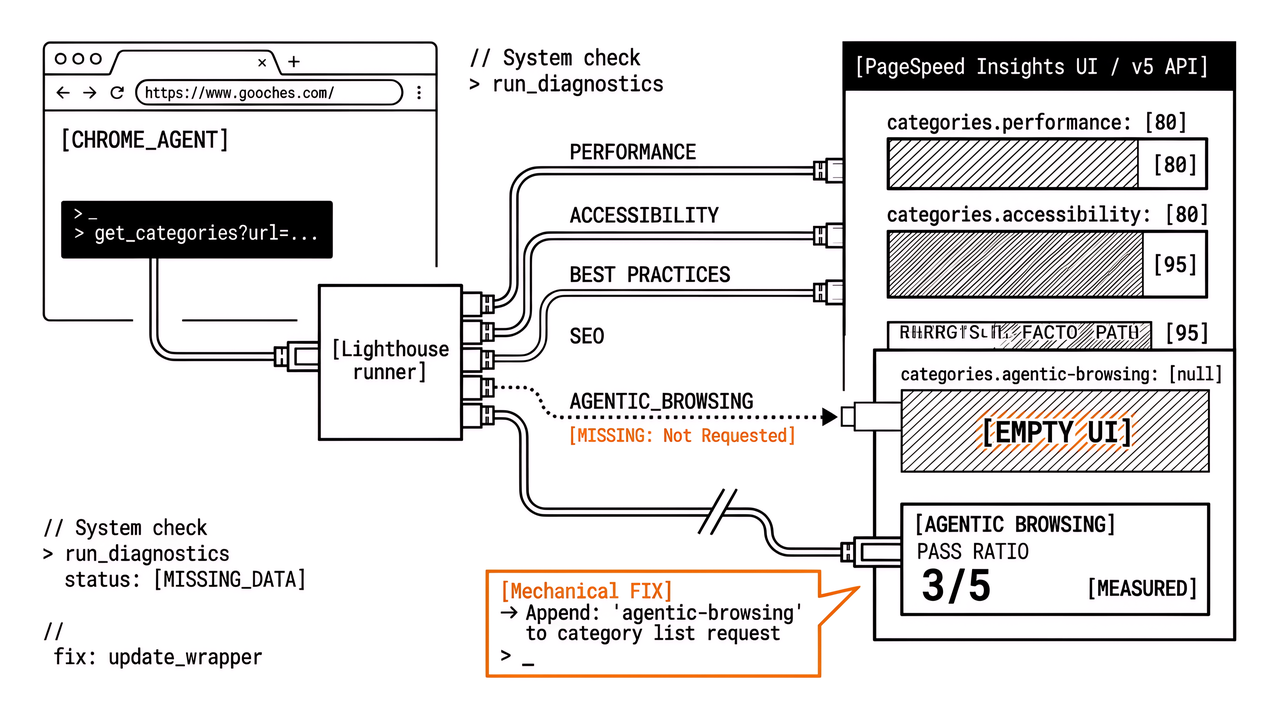
You open PageSpeed Insights for a client URL, chase the new Agentic Browsing talk from Chrome’s Lighthouse docs, and the panel is blank: no fractional ratio, no WebMCP rows, and sometimes the categories object in a keyed API response never lists agentic-browsing at all. That emptiness is easy to misread as “nothing to fix” or as “the product is broken.” Often it means something quieter. The category was never requested, the channel you used does not expose it yet, or every WebMCP check was marked not applicable and the UI looks hollow.
Watcher already covers what the category measures and how fractional scoring works in Lighthouse Agentic Browsing: How to rank in chatbots (Apogee Watcher). The companion ops question lives in PageSpeed Insights vs automated monitoring. What follows is the diagnosis agencies need first: why the surface looks empty, and what to do before anyone schedules a WebMCP sprint off a blank paste.
What empty Lighthouse Agentic Browsing means on PageSpeed Insights
Three different states get called “empty” in Slack threads after someone screenshots PageSpeed Insights. Only one of them is a real fail, and the other two are the ones that usually create false all-clears or false panic. Naming the state in the table below is the whole diagnosis; the rest of the post is how those rows show up in the UI and the API.
| What you see | Likely meaning | Safe client sentence |
|---|---|---|
| Category missing from UI or JSON | Agentic Browsing was not run (or not available on that surface) | “We have not measured agentic readiness on this pass.” |
| Audits marked N/A; thin or blank-looking rows | Checks did not apply (common when no WebMCP tools register) | “Applicable checks were limited; N/A is not a red score.” |
| Fractional ratio with fails or warnings | Category ran; specific readiness checks did not pass | “Agentic audits ran; here is what failed.” |
Chrome’s Lighthouse agentic browsing scoring documentation is clear that this category is experimental. It uses a pass ratio rather than a weighted 0–100 Performance-style score, and it can mark audits not applicable when a check does not fit the page. A hollow-looking panel is therefore not automatically “agent-ready,” and it is not automatically an SEO disaster either. It is a measurement state you have to name before you interpret it for a client.
Why PageSpeed Insights omits Agentic Browsing when the API never asks for it
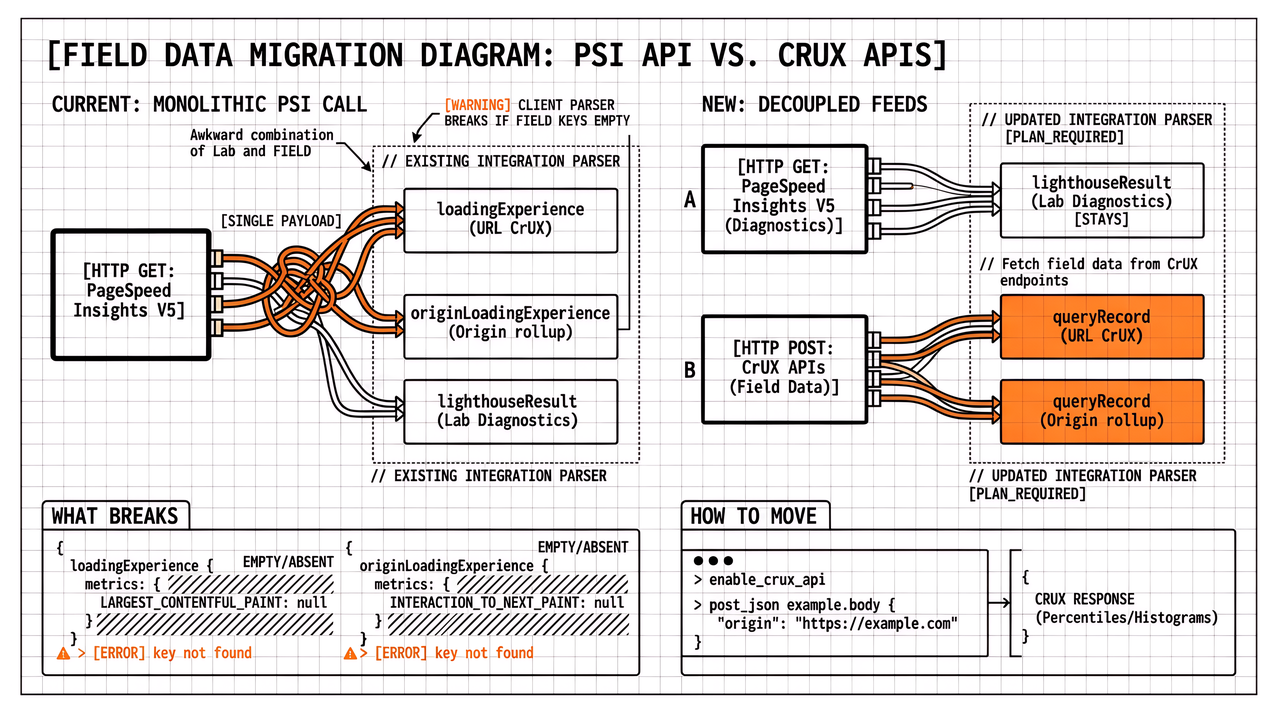
PageSpeed Insights is a Lighthouse runner with a product UI and a v5 API. Historically many automations request only PERFORMANCE, or rely on defaults that never expand the category list. Community write-ups of the Agentic Browsing rollout keep hitting the same trap: the HTTP response is 200, Performance looks fine, and the agentic object is simply absent because nobody passed category=agentic-browsing (or the emerging AGENTIC_BROWSING enum value) on the request. Silence in the payload is easy to treat as a clean bill of health, but it is not.
If your agency wrapper, Zapier job, or notebook still hard-codes the old four or five categories, Agentic Browsing will stay empty forever no matter how polished the site is. The fix is mechanical: request the category explicitly, then confirm it appears in the returned lighthouseResult.categories map before you write a client note. Treat a missing key as “not measured,” the same way you would treat a skipped Lighthouse pack in continuous integration.
Official PageSpeed Insights parameter documentation still lags the experimental surface in places. Verify against a live response and Chrome’s Agentic Browsing scoring page rather than assuming the marketing UI and your keyed script always share the same category set. When the docs and the payload disagree, trust the payload you can point at in the client folder.
PageSpeed Insights UI versus API versus local Lighthouse
Empty can also be a channel mismatch. The public PageSpeed Insights UI, the keyed PageSpeed Insights API, and a local lighthouse CLI run against a pinned Chrome build are three delivery paths, and experimental categories appear unevenly across them. Chrome’s scoring note calls out Chrome version requirements and WebMCP origin-trial constraints for some audits. A Canary or fresh Lighthouse CLI run may show Agentic Browsing while a PageSpeed Insights paste on an older backend path still omits it. DebugBear and other lab vendors have documented the same experimental framing: under development, not a ranking hammer, and not an automatic fail when WebMCP tools simply are not registered.
Before you tell a client that PageSpeed Insights shows no agentic score, record which surface you used, which Lighthouse version string appears in the JSON, and whether the category key exists at all. That paperwork is dull, but it is still cheaper than arguing about WebMCP schema validity on a run that never collected the audits.
How to confirm Agentic Browsing ran before you read the ratio
Use this when a report looks blank.
- Confirm the category object. In PageSpeed Insights API JSON, look for an agentic or
agentic-browsingentry under categories. If it is missing, stop diagnosing the site and fix the request (or change surface). - Separate N/A from fail. WebMCP audits often become not applicable when no tools register. That can leave a sparse table. Sparse is not the same as a failed schema check.
- Read the fractional ratio as coverage. Per Chrome’s scoring guide, you get a pass ratio of applicable readiness checks, not a Performance-style 0–100 blend. Do not invent a “we scored 87 agentic” line for a retainer deck.
- Pin versions for anything you schedule. One-off UI pastes drift. If Agentic Browsing matters to a roadmap, pin Lighthouse in continuous integration or in a monitoring product that stores lab history, as argued in the Watcher PageSpeed Insights versus automated monitoring piece.
- Keep CLS and accessibility hygiene on the main track. Even while WebMCP stays experimental, layout stability and an honest accessibility tree are the overlapping work Chrome already ties to agent navigation. Those programmes do not wait for the category to graduate.
Should you monitor Agentic Browsing now or treat it as R&D?
For most agency portfolios, Agentic Browsing is an R&D and hygiene signal until clients ask for it by name. Core Web Vitals field data, LCP and INP regressions, and scheduled lab Performance still carry the retainer. Logging the new fractional ratio beside those series is useful; making it the headline KPI is not.
Cost of inaction is not “miss the agentic SEO wave.” It is quieter: pasting a blank PageSpeed Insights panel into a deck as proof of readiness, or burning a sprint on WebMCP annotations because someone misread N/A rows as failures. Name the measurement state first, then decide whether WebMCP, llms.txt, or plain accessibility and CLS work is the next ticket.
When you do want history across many client hosts, layer scheduled lab collection on top of one-off PageSpeed Insights pastes rather than replacing your field story. Spot checks still help for triage, but they do not store a comparable series when the category list itself keeps changing. Apogee Watcher is built for that multi-tenant cadence; the product path is optional once the diagnosis is clear.
FAQ
Is a missing Agentic Browsing panel a Google ranking problem?
No evidence in Chrome’s Agentic Browsing scoring docs treats the experimental category as a Search ranking factor. Treat empty or fractional results as readiness signals for machine interaction, not as a substitute for Core Web Vitals or Search Console.
Why do WebMCP rows look empty even when the category ran?
If the page never registers WebMCP tools, related audits may be not applicable and drop out of the pass ratio. That is expected behaviour documented across Chrome’s framing and vendor explainers; it is not automatic failure.
We have llms.txt and PageSpeed Insights still complains. Is that “empty” too?
Usually not. That is a failed or warning audit inside a category that did run. GitHub reports show cases where the public file looks fine in a browser while the PageSpeed Insights fetch receives a different payload (for example HTML from a bot challenge). Fix fetch authenticity before rewriting Markdown link syntax for the third time.
Should we block releases on Agentic Browsing?
Not as a hard gate while the category is experimental and surfaces disagree. Prefer informational logging, pinned versions, and human review when the ratio moves on a primary landing page or checkout URL that already carries a Core Web Vitals budget.
Next step when Agentic Browsing looks empty
Agency technical leads: before the next client asks whether you are “agent-ready,” run one URL where you deliberately request Agentic Browsing, confirm the category key exists, and write the three-state table (absent / N/A / fail) into your internal runbook. That is the same blank-panel problem from the opening, now with a named state instead of a shrug. Use Lighthouse Agentic Browsing scoring on Watcher for the audit map, and PageSpeed Insights versus automated monitoring when you are ready to stop relying on one blank paste. If you want scheduled lab history across the portfolio, start a Watcher trial. Leaving silence unnamed is how false all-clears enter the deck.
References
- Lighthouse agentic browsing scoring (Chrome for Developers)
- PageSpeed Insights API: runpagespeed (Google for Developers)
- Google Lighthouse Has A New Agentic Browsing Category (DebugBear)
- Lighthouse now grades your site for AI agents (Belchamber; API category omission)
- Lighthouse issue 17194: Agentic Browsing false negative on llms.txt (GoogleChrome/lighthouse)
- Lighthouse Agentic Browsing: How to rank in chatbots (Apogee Watcher)
- PageSpeed Insights vs automated monitoring (Apogee Watcher)
About the author
- Apogee Information Systems operates at the intersection of digital transformation for international organisations, innovative e-learning, public service automation, and specialised commercial solutions. Currently building Apogee Watcher, a web performance tool for agencies and solopreneurs.
Comments
Join the discussionNo comments yet. Be the first to comment.
Industry insights & trends
Industry and trends angles for agencies: Chrome Stable, CWV updates, AI-shaped stacks, and what changes in client reporting.